Shadow AI · Shadow AI explainers and data
Shadow AI vs Shadow IT: What's Different and Why It Matters
By ThamimPublished October 26, 20266 min read
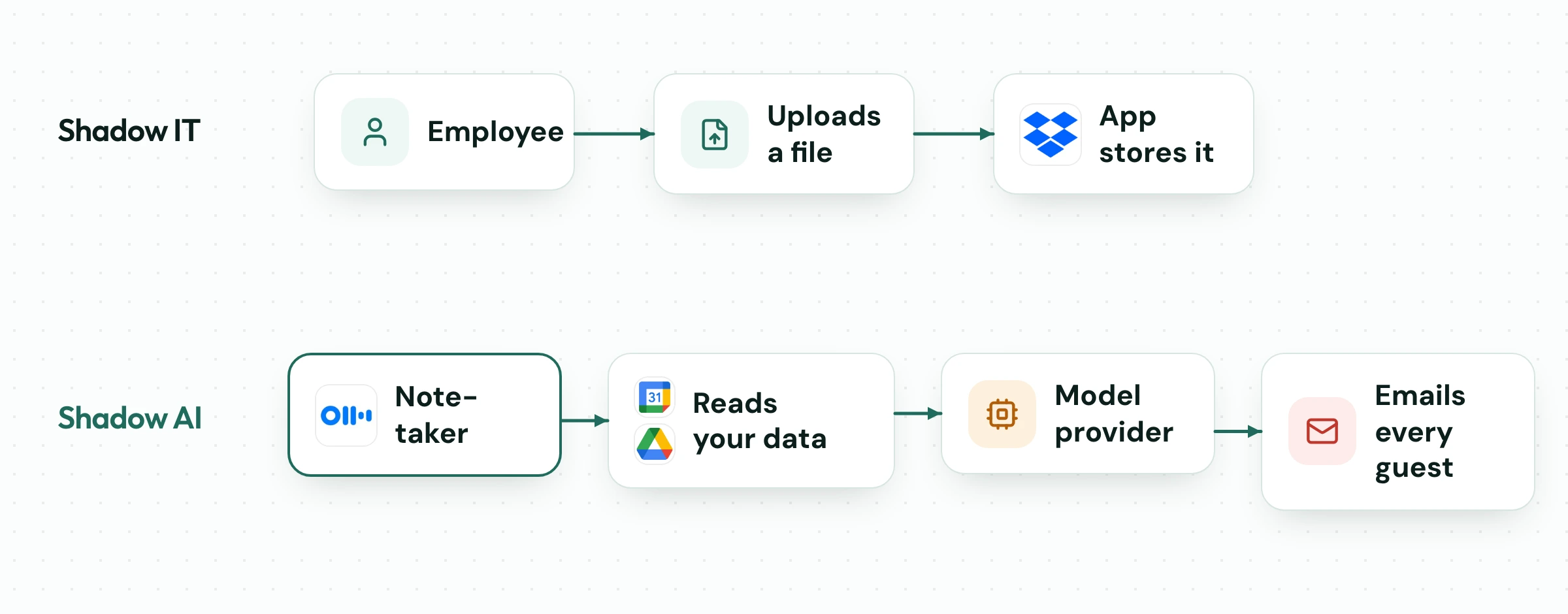
Shadow IT is any software, device or cloud service employees use for work without IT approval. Shadow AI is the part of shadow IT made up of AI tools, such as meeting recorders, writing assistants, chatbots and AI agents. The difference that matters is what the tool does with data: most shadow IT stores data, while shadow AI reads and processes it, and may send it to a model provider.
Who this is for: IT managers deciding whether shadow AI needs its own process or can be handled like any other unapproved app.
Shadow AI vs shadow IT at a glance
| Shadow IT | Shadow AI | |
|---|---|---|
| Definition | Any software, device or service used for work without IT approval | AI tools used with company data or accounts without IT approval |
| Examples | Personal Dropbox, Trello, Calendly, a team's own project tool | Otter.ai, Fireflies.ai, ChatGPT with a Drive connector, AI agents |
| How it usually arrives | Sign-up with a work email, Sign in with Google, a company card | Same routes, plus connectors added inside AI assistants |
| What it does with data | Stores what people put into it | Reads data to do its job: joins meetings, scans files, drafts replies |
| Where data goes | The vendor's servers | The vendor's servers, and often a model provider behind the vendor |
| Main risks | Duplicate spend, data in unmanaged places, access that outlives the employee | All of those, plus training on company data, wider data reach, actions taken by agents |
| How fast it spreads | One person at a time | Some tools invite meeting guests and colleagues, so one sign-up becomes several |
| How you find it in Google Workspace | OAuth grants in the Admin console | The same OAuth grants, then sorting out which apps are AI |
What is shadow IT?
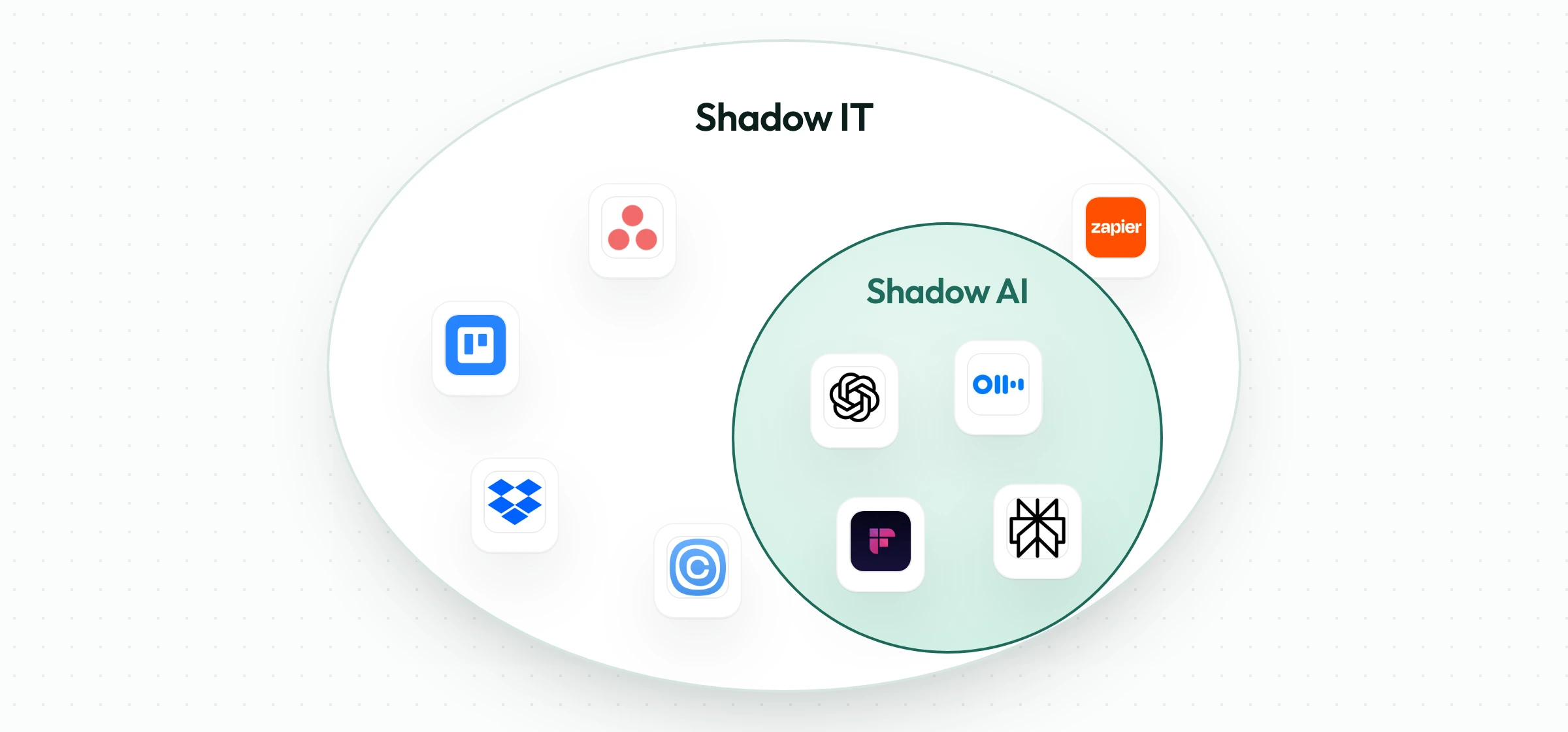
Shadow IT is any technology used for work that the IT team hasn't approved or doesn't know about. It covers SaaS apps signed up for with a work email, personal cloud storage used for company files, browser extensions, and software paid for on a personal or team card.
Shadow IT has been around as long as SaaS. The reasons haven't changed: the approved tool is missing a feature, the approval process is slow, or nobody knew there was one.
What is shadow AI?
Shadow AI is any AI tool employees use with company data or company accounts that IT hasn't approved. In a Google Workspace company, the most common form is an AI app connected with Sign in with Google and given access to Calendar, Drive or Gmail.
It's a subset of shadow IT, but it's growing faster. The Teramind Shadow AI Report 2026 puts the share of employees using AI tools their employer hasn't approved at 50 to 80% (Teramind). A 2026 Cloud Security Alliance research note found that 37% of companies have an AI governance policy in place (CSA).
For a longer definition with examples, see what shadow AI is and how to find it.
Why is shadow AI riskier than other shadow IT?
AI tools read data instead of waiting for it
A file-sharing app holds the files people upload. An AI meeting recorder with calendar access joins every meeting it can see, records it and writes a summary. A writing tool with full Drive access can open every document the person can open. The tool goes looking for data because that's how it works.
Data may be used for training
Some AI vendors use customer content to improve their models, especially on free plans. The setting is often buried in a privacy policy or an account toggle. With most shadow IT, the question doesn't come up.
AI tools spread on their own
Meeting note-takers often email summaries to everyone on the invite. People who sign up to read the summary connect their own calendar, and the tool reaches more of your company without anyone in IT seeing it.
AI agents take actions
AI agents and MCP connectors can send email, edit files and create records on a user's behalf. That makes the access an app holds matter more. See what shadow MCP is for more on this.
Customers ask about it
Security questionnaires increasingly ask which AI tools touch customer data and whether vendors train on it. "We don't know" is a hard answer to give.
Where shadow AI and shadow IT are the same
The detection method is the same. In Google Workspace, both arrive through an OAuth grant: someone clicks Sign in with Google, approves a list of scopes, and the app gets access. Both show up in the Admin console under Security > Access and data control > API controls > Manage App Access > Accessed apps.
The fix is also the same: find what's connected, check what each app can access, decide approve, review or block, and keep checking. You don't need two separate processes. You need one inventory with the AI tools marked, because they usually deserve a closer look first.
What should IT do about each?
| Step | Shadow IT | Shadow AI |
|---|---|---|
| Find it | Review OAuth grants, expense reports, SSO logs | Same, then identify which apps are AI |
| Check access | Which scopes the app holds | Which scopes it holds, and whether the vendor trains on customer data |
| Decide | Approve, consolidate or remove | Approve, review training settings, or block |
| Policy | Approved software list | Approved AI tools list, with rules on what data can go in |
| Follow up | Ask the owner if it's still in use | Ask the person who connected it what they use it for |
| Keep current | Recheck quarterly | Recheck monthly; new AI tools appear quickly |
How to find both in Google Workspace
- Open Manage App Access > Accessed apps in the Admin console.
- Sort by users and open the apps with the most users first.
- Expand each app's scopes. Drive, Gmail and full Calendar access need a closer look.
- Mark which apps are AI tools.
- Use Reporting > Audit and investigation > OAuth log events to see who connected each app.
The full walkthrough is in how to detect shadow AI in Google Workspace. For free ways to cover the rest of shadow IT, see free shadow IT discovery tools.
FAQ
Is shadow AI a type of shadow IT?
Yes. Shadow AI is the part of shadow IT made up of AI tools. It gets its own name because AI tools read and process company data, may use it for training, and can take actions through agents.
Is ChatGPT shadow AI?
It is when people use it for work without IT approval, especially with a personal account or with connectors to company Drive or Gmail. It isn't shadow AI if your company has approved it, for example on a business plan with training turned off.
Do I need a separate tool for shadow AI?
Not necessarily. In Google Workspace, both show up in the same OAuth grant list. What you need is a way to tell which apps are AI and what each one can access.
Which is the bigger risk for a small company?
Shadow AI, in most cases, because AI tools ask for wider access and spread faster. Shadow IT still costs money through duplicate subscriptions and forgotten renewals.
Doing this with AppControler
AppControler lists every app connected to your Google Workspace, so you get the shadow IT and shadow AI inventory in one place. AI tools are separated into their own list with a risk level, and every scope is translated into plain English. You can mark apps Approved, Review or Blocked and track renewals for the tools you keep. The Free plan covers up to 25 apps.
AppControler sees apps connected through Google Workspace sign-in. It doesn't see tools used with personal accounts, browser extensions or software paid for without a Google sign-in.
Get both lists in one scan
Every app connected to your Google Workspace, with the AI tools pulled into their own list and a risk level on each.
Run a free scanRead-only access. We never read email or file contents.