Shadow AI · Finding shadow AI
What Is Shadow MCP? How to Find Unapproved MCP Servers at Your Company
By ThamimPublished October 26, 2026Updated November 2, 20267 min read
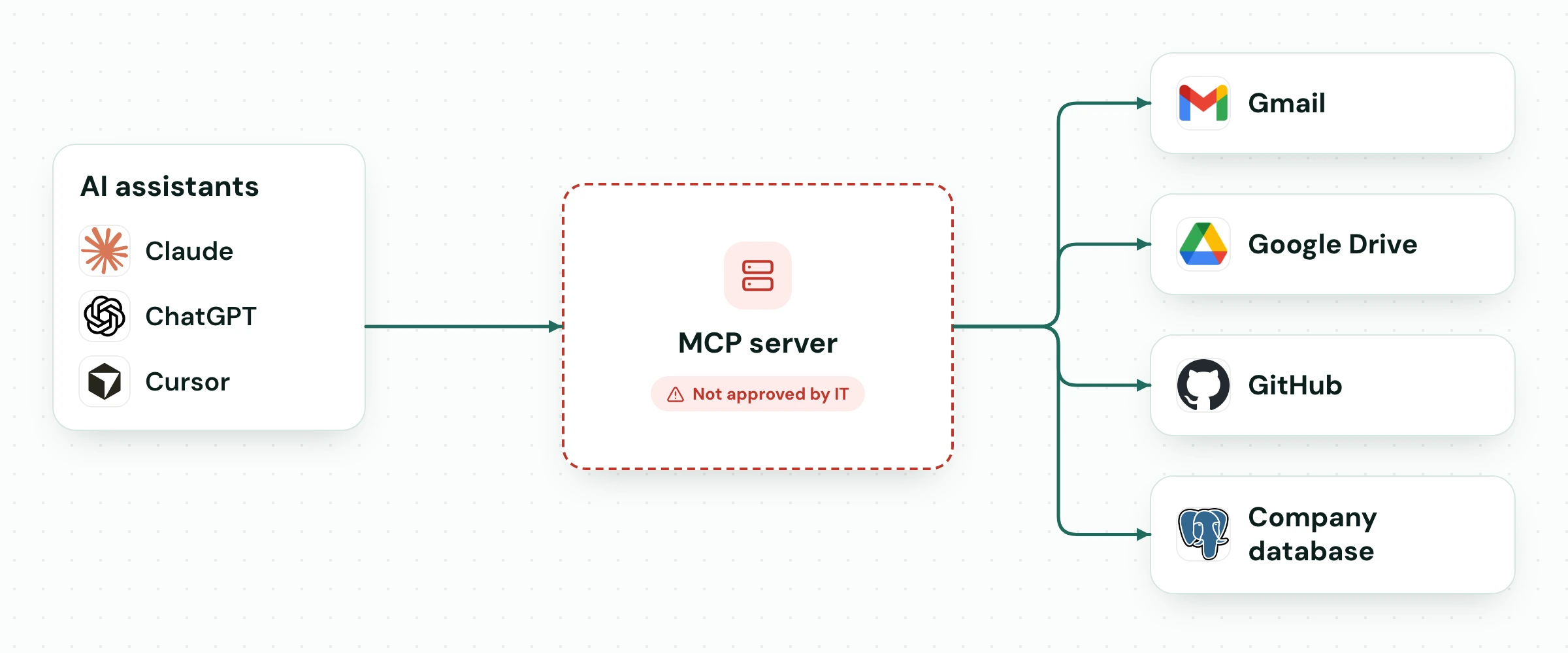
Shadow MCP is any Model Context Protocol (MCP) server or AI connector that employees set up without IT review. MCP servers let AI assistants like Claude, ChatGPT and Cursor read data and take actions in other systems. An unapproved one can read company email, files or databases and act on them, with nobody in IT knowing it exists.
Shadow MCP (sometimes searched as "MCP shadow") is a kind of shadow AI: the AI tool may be approved, but the connections it uses to reach company data were never reviewed.
Who this is for: IT managers at companies where people use Claude, ChatGPT, Cursor or other AI tools at work, and there's no dedicated security team.
What is MCP?
The Model Context Protocol is an open standard, released by Anthropic in November 2024, that lets AI assistants call tools in other apps. An MCP server sits between the assistant and a system such as Gmail, Google Drive, GitHub, a database or a CRM. It tells the assistant what it can do there ("search email", "create a ticket", "run a query") and carries out the request.
There are two kinds you'll come across:
| Kind | Where it runs | How people add it | Example |
|---|---|---|---|
| Local MCP server | On the employee's laptop, started by the AI app | Editing a config file in Claude Desktop, Cursor, VS Code or Claude Code | A GitHub or Postgres server installed with npx or uvx |
| Remote MCP server (connector) | On the vendor's servers | Pasting a URL into Claude or ChatGPT and signing in with OAuth | A vendor's hosted MCP connector for Asana, Notion or Google Drive |
What makes an MCP server "shadow"?
An MCP server is shadow MCP when it runs outside any IT review: nobody approved it, nobody knows which data it can reach, and nobody would notice if it changed. The OWASP MCP Top 10 lists shadow MCP servers as a risk category of their own (MCP09).
Most shadow MCP isn't malicious. A developer wants Claude to read their GitHub issues, or an ops lead wants ChatGPT to search the team's Drive. Setting up an MCP server takes a few minutes and there's no approval step built in.
How is shadow MCP different from shadow AI?
Shadow AI is an AI tool used without review. Shadow MCP is a connection that gives an AI tool reach into another system. An approved assistant, such as a company Claude Team plan, becomes a shadow AI problem the moment someone connects it to an unapproved MCP server with access to company data.
The bigger difference is action. Most SaaS apps read data and show it to you. An MCP server lets an AI agent send email, edit files, create tickets or run queries on the user's behalf, often several steps in a row.
What are the risks of shadow MCP?
| Risk | What it looks like | Real example |
|---|---|---|
| Malicious or copied packages | A server installed from a public registry that does more than it says | In September 2025, a copied npm package called postmark-mcp was found sending a BCC of every email it sent to an outside address. It had been downloaded 1,643 times (The Hacker News) |
| Vendor bugs | A legitimate vendor's MCP server exposes data across customers | In June 2025, Asana took its MCP server offline after a bug could expose one customer's data to other customers. Asana estimated about 1,000 customers were affected (UpGuard) |
| Vulnerable client tools | The software that connects to MCP servers has a security flaw | CVE-2025-6514 in mcp-remote (CVSS 9.6) allowed command execution on the user's machine when connecting to a malicious server. Fixed in version 0.1.16 (JFrog) |
| Broad access | A server set up with a personal access token or admin credentials that can reach far more than the task needs | A database server connected with a read-write admin user |
| No record | No log of what the AI did through the server | Nobody can say which files or emails an agent read last month |
| Access that outlives the person | Tokens keep working after someone stops using the tool or leaves | An OAuth grant from a leaver still active months later |
Where to look for shadow MCP
There's no single list of every MCP server at a company. You check a few places.
1. Google Workspace and Microsoft 365 OAuth grants
Remote MCP connectors that reach Google data, such as a Google Drive or Gmail connector in Claude or ChatGPT, use OAuth. They leave a grant under the AI app's name with the scopes the person approved. Local MCP servers that call Google APIs need OAuth too, so they often show up as an unfamiliar app, sometimes an unverified one the employee created in their own Google Cloud project.
In Google Workspace, check Security > Access and data control > API controls > Manage App Access > Accessed apps. Look for AI assistants with Drive or Gmail access and for app names you don't recognise. The full process is in how to detect shadow AI in Google Workspace.
2. AI app admin settings
If your company pays for business plans, check what's allowed:
- Claude Team and Enterprise: an Owner or Primary Owner adds custom connectors to the organization, and members then connect to them individually (Anthropic).
- ChatGPT Business and Enterprise: only admins and owners can turn on developer mode and publish custom MCP apps for the workspace. Enterprise admins can limit it further with role-based access (OpenAI).
If people use personal or free accounts for work, none of these controls apply. That alone is worth knowing.
For the ChatGPT settings in detail, see ChatGPT connectors and custom MCP connectors.
3. Config files on developer machines
Local MCP servers are listed in config files. The common locations (checked 2026-10-26, and they do change):
| App | Config file |
|---|---|
| Claude Desktop (macOS) | ~/Library/Application Support/Claude/claude_desktop_config.json |
| Claude Desktop (Windows) | %APPDATA%\Claude\claude_desktop_config.json |
| Claude Code | ~/.claude.json and .mcp.json in each project |
| Cursor | ~/.cursor/mcp.json and .cursor/mcp.json in each project |
| VS Code | .vscode/mcp.json in each project, plus user settings |
If you have device management, you can collect these files. If not, ask developers to send you theirs. It takes them two minutes.
4. Ask
Ask each team lead: "Which AI tools do you connect to other systems, and how?" People will usually tell you if they know the question isn't a trap.
How to manage MCP without banning it
- Keep an approved list. Name the MCP servers and connectors people can use and what each one may access. Start from what you found, not a blank page.
- Prefer official servers. Use servers published by the vendor of the system being connected. Check the publisher before installing anything from a public registry.
- Pin versions. For local servers, pin a version instead of pulling the latest each time. The
postmark-mcpchange arrived in an update. - Use narrow credentials. Connect with read-only or scoped tokens. Don't use admin accounts or long-lived personal tokens with full access.
- Use the controls you're paying for. Turn on admin-only connector setup in Claude and ChatGPT business plans.
- Recheck monthly. Review OAuth grants and connector lists for anything new.
- Clean up on offboarding. Revoke OAuth grants and rotate any tokens a leaver used for MCP servers.
What this doesn't cover
AppControler sees MCP connectors and servers that reach Google Workspace data through OAuth, because they leave a grant. It doesn't see local MCP servers that use API keys, read local files or connect to systems outside Google Workspace. For those, use the config files and team check-ins above.
FAQ
What is shadow MCP in simple terms?
An MCP server or AI connector that someone at your company set up without IT knowing. It lets an AI assistant read or change company data through a connection nobody reviewed.
Is MCP itself a security risk?
MCP is a protocol, like an API standard. The risk comes from which servers people connect, where those servers come from, and what credentials they hold. An approved, official server with read-only access is a reasonable thing to allow.
Can I block MCP servers in Google Workspace?
You can block or limit the OAuth apps that MCP connectors use to reach Google data, in Manage App Access. You can't block a local MCP server from Google's side if it doesn't use Google data.
What's the difference between a connector and an MCP server?
In Claude and ChatGPT, "connector" or "app" is usually the product name for a remote MCP server added to the assistant. Under the hood they use the same protocol.
Do I need to worry about shadow MCP if we don't have developers?
Yes, but less. Non-developers mostly use remote connectors inside Claude or ChatGPT, which you can find through OAuth grants and the AI app's admin settings. Local config-file servers are mostly a developer habit.
How do I know if an MCP server is official?
Check that the vendor of the connected system publishes it in their own documentation or GitHub organization. Be wary of packages with the same name from a different publisher. That's how postmark-mcp caught people out.
Doing this with AppControler
AppControler lists every app connected to your Google Workspace, including AI assistants with Drive, Gmail or Calendar connectors, along with who connected each one and what its scopes allow in plain English. You can mark each app Approved, Review or Blocked and message the person who connected it from Slack. The Free plan covers up to 25 apps.
Find AI connectors with data access
See which AI assistants and connectors hold Drive, Gmail or Calendar access in your Google Workspace, and who added them.
Find my AI connectorsRead-only access. We never read email or file contents.