Shadow IT · Finding and auditing connected apps
Google Workspace OAuth Scopes Explained: What Each Permission Lets an App Do
By ThamimPublished October 26, 20268 min read
A Google OAuth scope is a single permission an app asks for when someone clicks Sign in with Google, such as reading their calendar or editing their Drive files. The scope string decides what the app can do with that person's data. The scopes to watch most closely are drive, drive.readonly, https://mail.google.com/, gmail.readonly and calendar, because each gives an app broad access to company data.
Who this is for: Google Workspace admins reviewing connected apps in the Admin console.
How to use this page: find the scope string you saw on an app's details page and read across. To paste several at once, use the OAuth scope translator. Consent screen text is quoted from Google's OAuth 2.0 scopes list, checked 2026-10-26. The "Level" column is our rating of how much company data the scope exposes.
Where to find an app's scopes
In the Admin console, go to Security > Access and data control > API controls > Manage App Access > Accessed apps, open an app, and click Expand All. Scopes appear as full URLs, for example https://www.googleapis.com/auth/drive.readonly. Google doesn't show scopes for Google-owned apps.
Levels used on this page
| Level | Meaning |
|---|---|
| Sign-in | Identity only: name, email, profile photo |
| Low | Limited data, or only data the app created or the user picked |
| Medium | Reads a whole category of data, such as every calendar event |
| High | Reads all of a person's email or files, or can change and delete them |
Sign-in scopes
| Scope | Consent screen says | What it means | Level |
|---|---|---|---|
openid | Associate you with your personal info on Google | Lets the app confirm who the user is | Sign-in |
https://www.googleapis.com/auth/userinfo.email (also email) | See your primary Google Account email address | The user's email address | Sign-in |
https://www.googleapis.com/auth/userinfo.profile (also profile) | See your personal info, including any personal info you've made publicly available | Name and profile photo | Sign-in |
An app with only these three scopes can't read email, files or calendars. This is what a plain Sign in with Google asks for. See Sign in with Google at work.
Google Drive scopes
| Scope | Consent screen says | What it means | Level |
|---|---|---|---|
https://www.googleapis.com/auth/drive | See, edit, create, and delete all of your Google Drive files | Full read and write access to every file the user can open, including files shared with them and shared drives they belong to | High |
https://www.googleapis.com/auth/drive.readonly | See and download all your Google Drive files | Can read and download every file the user can open | High |
https://www.googleapis.com/auth/drive.metadata.readonly | See information about your Google Drive files | File names, owners, sharing settings and dates, but not file contents | Medium |
https://www.googleapis.com/auth/drive.file | See, edit, create, and delete only the specific Google Drive files you use with this app | Only files the user opens or creates with the app | Low |
https://www.googleapis.com/auth/drive.appdata | See, create, and delete its own configuration data in your Google Drive | A hidden folder for the app's own settings | Low |
https://www.googleapis.com/auth/drive.meet.readonly | See and download your Google Drive files that were created or edited by Google Meet. | Meet recordings, transcripts and notes in Drive | Medium |
drive vs drive.readonly vs drive.file
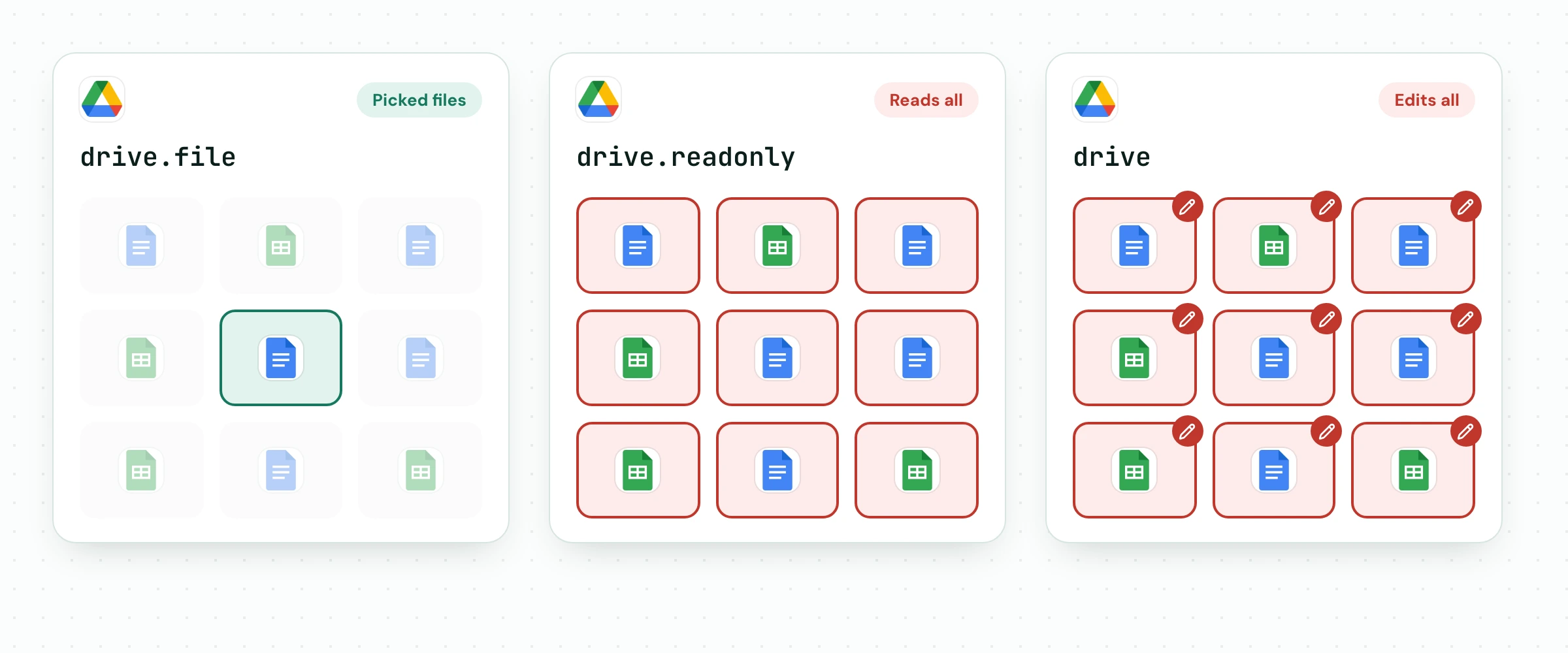
These three look similar on a consent screen and are very different in practice:
drivelets the app read, change and delete everything the person can open in Drive.drive.readonlylets the app read and download everything the person can open. It can't change anything, but it can still copy every file to the vendor.drive.fileonly covers files the person picks in the app or creates with it. Most of Drive stays out of reach.
If an AI writing tool asks for drive, it can read every document the person has access to, including ones unrelated to the task. Prefer apps that use drive.file.
Gmail scopes
| Scope | Consent screen says | What it means | Level |
|---|---|---|---|
https://mail.google.com/ | Read, compose, send, and permanently delete all your email from Gmail | Full mailbox control | High |
https://www.googleapis.com/auth/gmail.modify | Read, compose, and send emails from your Gmail account | Read everything, send email, change labels. Can't permanently delete | High |
https://www.googleapis.com/auth/gmail.readonly | View your email messages and settings | Read every email and setting | High |
https://www.googleapis.com/auth/gmail.compose | Manage drafts and send emails | Create drafts and send email as the user | Medium |
https://www.googleapis.com/auth/gmail.send | Send email on your behalf | Send email as the user, without reading the inbox | Medium |
https://www.googleapis.com/auth/gmail.metadata | View your email message metadata such as labels and headers, but not the email body | Who emails whom, subjects and dates, without message bodies | Medium |
https://www.googleapis.com/auth/gmail.settings.sharing | Manage your sensitive mail settings, including who can manage your mail | Can set up forwarding and delegation | High |
Watch for gmail.settings.sharing in particular: mail forwarding to an outside address is a common way data leaves a company.
Google Calendar scopes
| Scope | Consent screen says | What it means | Level |
|---|---|---|---|
https://www.googleapis.com/auth/calendar | See, edit, share, and permanently delete all the calendars you can access using Google Calendar | Full control of every calendar the user can access, including sharing | High |
https://www.googleapis.com/auth/calendar.readonly | See and download any calendar you can access using your Google Calendar | Every calendar the user can see, including colleagues' shared calendars | Medium |
https://www.googleapis.com/auth/calendar.events | View and edit events on all your calendars | Read, create, change and delete events | Medium |
https://www.googleapis.com/auth/calendar.events.readonly | View events on all your calendars | Every event, attendee list and meeting link | Medium |
https://www.googleapis.com/auth/calendar.events.owned | See, create, change, and delete events on Google calendars you own | Events on the user's own calendars only | Medium |
https://www.googleapis.com/auth/calendar.freebusy | View your availability in your calendars | Busy and free times, no event details | Low |
https://www.googleapis.com/auth/calendar.app.created | Make secondary Google calendars, and see, create, change, and delete events on them | Only calendars the app creates | Low |
Calendar access matters more than it looks. Event descriptions often contain meeting links, dial-in codes, agendas and customer names. AI note-takers use calendar access to find and join meetings. See what AI meeting note-takers can access.
Contacts scopes
| Scope | Consent screen says | What it means | Level |
|---|---|---|---|
https://www.googleapis.com/auth/contacts | See, edit, download, and permanently delete your contacts | Full control of the user's contacts | Medium |
https://www.googleapis.com/auth/contacts.readonly | See and download your contacts | The user's contact list | Medium |
https://www.googleapis.com/auth/contacts.other.readonly | See and download contact info automatically saved in your "Other contacts" | Everyone the user has emailed, saved automatically | Medium |
Docs, Sheets and Meet scopes
| Scope | Consent screen says | What it means | Level |
|---|---|---|---|
https://www.googleapis.com/auth/documents | See, edit, create, and delete all your Google Docs documents | Every Google Doc the user can open | High |
https://www.googleapis.com/auth/documents.readonly | See all your Google Docs documents | Read every Google Doc | High |
https://www.googleapis.com/auth/spreadsheets | See, edit, create, and delete all your Google Sheets spreadsheets | Every Google Sheet the user can open | High |
https://www.googleapis.com/auth/spreadsheets.readonly | See all your Google Sheets spreadsheets | Read every Google Sheet | High |
https://www.googleapis.com/auth/meetings.space.readonly | Read information about any of your Google Meet conferences | Meet conference records and participants | Medium |
Admin scopes
| Scope | Consent screen says | What it means | Level |
|---|---|---|---|
https://www.googleapis.com/auth/admin.directory.user.readonly | See info about users on your domain | Your company's user directory | Medium |
Admin scopes only work when the person who approves them is an admin. An app holding admin scopes from a super admin account deserves a close look.
What "offline access" means
Many apps also ask for offline access (access_type=offline in the sign-in request). It doesn't appear as a separate scope in the Admin console, but it gives the app a refresh token, so it keeps access when the user isn't signed in. Most apps that sync data in the background use it. Access stays until the user or an admin revokes it.
How to restrict apps by scope
In Manage App Access, each app can be set to:
| Setting | What it does |
|---|---|
| Trusted | Can access all Google Workspace services, including restricted ones |
| Limited | Can only access Google services you haven't restricted |
| Specific Google data | Can only request the scopes you choose |
| Blocked | Can't access any Google service |
Specific Google data is the most useful setting for apps that ask for more than they need. For example, you can let a tool use drive.file but not drive. Source: Google.
FAQ
What's the most dangerous Google OAuth scope?
https://mail.google.com/ and https://www.googleapis.com/auth/drive give the widest access: full control of a person's email or every file they can open. gmail.settings.sharing is also high risk because it can set up mail forwarding.
Is drive.readonly safe?
It can't change files, but it can read and download every file the person can open. For a third-party app, that is still broad access to company data.
Does an app with drive access see shared drives?
Yes, if the person who connected it is a member of those shared drives. The app gets the same access to Drive that the person has.
Why does an app need calendar access for sign-in?
It usually doesn't. Some apps ask for calendar access at sign-up because their core feature depends on it, such as scheduling tools and meeting note-takers. If a tool asks for calendar or Drive access just to create an account, check why.
Do scopes change after an app is approved?
An app can ask for more scopes later, and the user sees a new consent screen. Recheck an app's scopes when you review your connected apps.
Doing this with AppControler
AppControler reads every app's scopes across your Google Workspace and shows them in plain English with a level next to each one, so you don't have to look up scope strings one at a time. It also shows who connected each app and separates out the AI tools. The Free plan covers up to 25 apps.
AppControler reads which apps people authorized and what scopes they hold. It doesn't read email or file contents.
Get every scope translated
See the scopes every connected app holds across your Workspace, in plain English with a risk level next to each.
Translate my scopesRead-only access. We never read email or file contents.