SaaS renewals · Tracking renewals
Free SaaS Renewal Tracker Template: Google Sheets Setup for IT Managers
By ThamimPublished October 26, 20267 min read
A SaaS renewal tracker is a list of every software contract with its renewal date, notice period and owner, plus reminders before each deadline. This free Google Sheets template works out the act-by date (the last day you can cancel or change a contract) for each row, shows how many days are left, and can email you at 90, 60, 30 and 7 days before it.
Who this is for: IT managers and ops leads who own software renewals at a company with no procurement team.
Why track the act-by date, not the renewal date?
Most SaaS contracts renew automatically unless you give notice before a deadline. That deadline is the act-by date: the renewal date minus the notice period. If a contract renews on 1 March 2027 with 30 days' notice, the act-by date is 30 January 2027. A reminder on 1 March is a month too late.
A tracker built around renewal dates tells you when you've been charged. A tracker built around act-by dates tells you when you can still do something about it. More on this in renewal date vs notice deadline.
What's in the template
| Column | What to enter | Filled in automatically? |
|---|---|---|
| App | Product name | No |
| Vendor | Company you pay | No |
| Owner | The one person who decides on this renewal | No |
| Plan and seats | Plan name and how many seats or licences | No |
| Cost per term | What you pay each term, in your currency | No |
| Billing | Monthly or Annual | No |
| Renewal date | Date the next term starts | No |
| Notice (days) | Notice period in days. Use 30 if the contract doesn't say | No |
| Act-by date | Renewal date minus notice | Yes |
| Days left | Days until the act-by date | Yes |
| Status | OK, Review usage, Talk to vendor, Act now, or Missed | Yes |
| Auto-renews | Yes or No | No |
| Decision | Renew, Downgrade, Cancel, Renegotiate | No |
| Contract link | Link to the contract or order form | No |
| Notes | Anything the next person needs to know | No |
Example rows
| App | Owner | Cost per term | Renewal date | Notice | Act-by date | Status (on 26 Oct 2026) |
|---|---|---|---|---|---|---|
| Example: Zoom | Sam (IT) | 3,750 | 15 Jan 2027 | 60 days | 16 Nov 2026 | Act now |
| Example: Notion | Priya (Ops) | 9,600 | 1 Mar 2027 | 30 days | 30 Jan 2027 | OK |
The Zoom renewal is months away, but the 60-day notice period means the decision is due in three weeks.
How to set it up in Google Sheets
- Download the CSV template.
- In Google Sheets, go to File > Import > Upload and choose the file. Pick Replace current sheet.
- Rename the tab to
Renewals(the reminder script below looks for that name). - Select the Renewal date and Act-by date columns and set Format > Number > Date.
- Delete the two example rows once you've added your own. Copy the formulas in columns I, J and K down to every row you use.
- Sort by Act-by date so the next deadline is always at the top.
The formulas
If you'd rather build your own sheet, these are the three formulas, written for row 2:
Act-by date (column I):
=IF(OR(G2="",H2=""),"",G2-H2)Days left (column J):
=IF(I2="","",I2-TODAY())Status (column K):
=IF(J2="","",IF(J2<0,"Missed",IF(J2<=30,"Act now",IF(J2<=60,"Talk to vendor",IF(J2<=90,"Review usage","OK")))))Add colour
Select column K, then Format > Conditional formatting. Add a rule for each status: "Text is exactly" Act now in red, Talk to vendor in orange, Review usage in yellow, Missed in grey.
How to get email reminders from the sheet
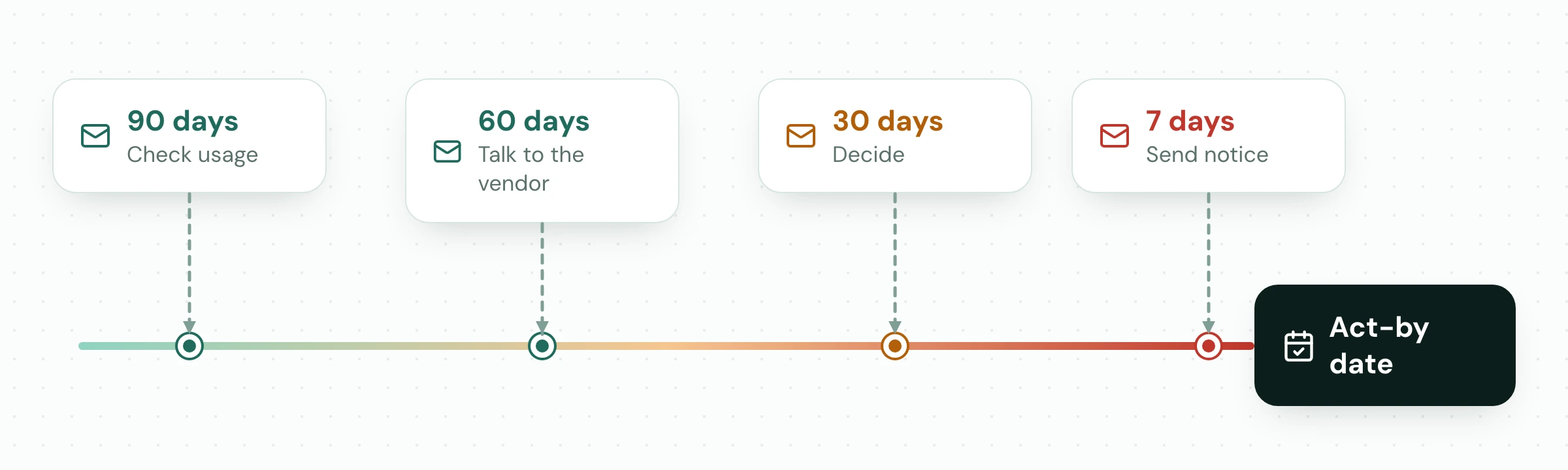
Google Sheets doesn't send date-based reminders on its own. A short Apps Script can email you when a contract hits 90, 60, 30 or 7 days before its act-by date.
- In the sheet, go to Extensions > Apps Script.
- Replace the code with this:
function renewalReminders() {
  const sheet = SpreadsheetApp.getActive().getSheetByName('Renewals');
  const rows = sheet.getDataRange().getValues().slice(1);
  const today = new Date();
  today.setHours(0, 0, 0, 0);

  const due = rows
    .filter((r) => r[8] instanceof Date)
    .map((r) => ({
      app: r[0],
      owner: r[2],
      actBy: r[8],
      days: Math.round((r[8] - today) / 86400000),
    }))
    .filter((r) => [90, 60, 30, 7].includes(r.days));

  if (due.length === 0) return;

  const body = due
    .map((r) => `${r.app}: act by ${r.actBy.toDateString()} (${r.days} days). Owner: ${r.owner}`)
    .join('\n');

  MailApp.sendEmail(
    Session.getActiveUser().getEmail(),
    `Renewals: ${due.length} act-by date(s) coming up`,
    body
  );
}- Click Save, then Run once and approve the permissions it asks for.
- Click the clock icon (Triggers) > Add Trigger. Choose
renewalReminders, Time-driven, Day timer, and a time in the morning.
You'll get one email on each day a contract reaches 90, 60, 30 or 7 days before its act-by date. Change the numbers in [90, 60, 30, 7] to suit your contracts.
How to fill it in the first time
- List what you pay for. Export the last 12 months of card and invoice payments and pull out every software vendor.
- Add what's connected. Check the apps connected to your Google Workspace under Security > Access and data control > API controls > Manage App Access. Some paid tools won't be on the card statement because a team lead expenses them.
- Find each contract. Look for the order form, the terms page or the billing page in the vendor's admin settings. The notice period is usually under "Term and termination" or "Renewal".
- Name an owner. One person per contract. If nobody wants it, ask whether you still need the tool.
- Start with annual contracts. Monthly plans can usually be cancelled any time. Annual contracts with notice periods are where you lose money.
When a spreadsheet stops being enough
A spreadsheet works well while one person owns it and opens it every week. It starts to slip when:
- You have more than 30 or 40 contracts and the sheet isn't sorted by act-by date anymore
- Several people own renewals and nobody is sure who updated what
- New tools appear faster than you add rows, because nobody tells IT when they sign up
- Reminders go to one inbox and get missed when that person is away
For a comparison of tools that take over from here, see the best contract renewal trackers.
FAQ
Is this renewal tracker really free?
Yes. The template is a CSV you import into Google Sheets, and the reminder script runs on your own Google account. There's no sign-up.
Does it work in Excel?
The formulas work in Excel. The reminder script is Google Apps Script, so it only works in Google Sheets. In Excel you'd need Power Automate or calendar reminders instead.
What notice period should I use if the contract doesn't say?
Use 30 days as a safe default, then check the vendor's terms of service. Some vendors set notice in their online terms rather than the order form.
What if the notice period is in months, not days?
Convert it to days and round up. "One month's notice" before 1 March means 1 February at the latest. Entering 31 days puts your act-by date at 29 January, which gives you a small buffer.
Should I track monthly subscriptions too?
Add them so you know what you're paying for, but set the notice to 0 if they can be cancelled any time. The reminders matter most for annual contracts.
Doing this with AppControler
AppControler's renewal tracker does the same job without the formulas. Upload a contract PDF and it reads the renewal date, notice period and plan (the PDF parsing uses AI, so check what it pulls out). It works out the act-by date and sends alerts at 90, 60 and 30 days, plus an optional last call. Alerts can also go to Slack and Google Calendar. See how contract renewal tracking works from upload to reminder.
Because AppControler also scans your Google Workspace for connected apps, you can add a discovered app to the tracker in one click, which helps with the tools nobody told IT about.
The Free plan keeps up to 25 contracts. Renewals is $29 a month flat for 250 renewals, with notice-period alerts, contract reading and CSV import.
Not sure when a spreadsheet stops being enough? See renewal management software vs a spreadsheet and subscription renewal management.
Upload a contract, get the act-by date
AppControler reads the renewal date and notice period from the PDF and works out the last day to cancel. Free for up to 25 contracts.
Track my first renewalRead-only access. We never read email or file contents.